Why HD+ Channels Sometimes Stop Working
Estimated Reading Time: 13 minutes
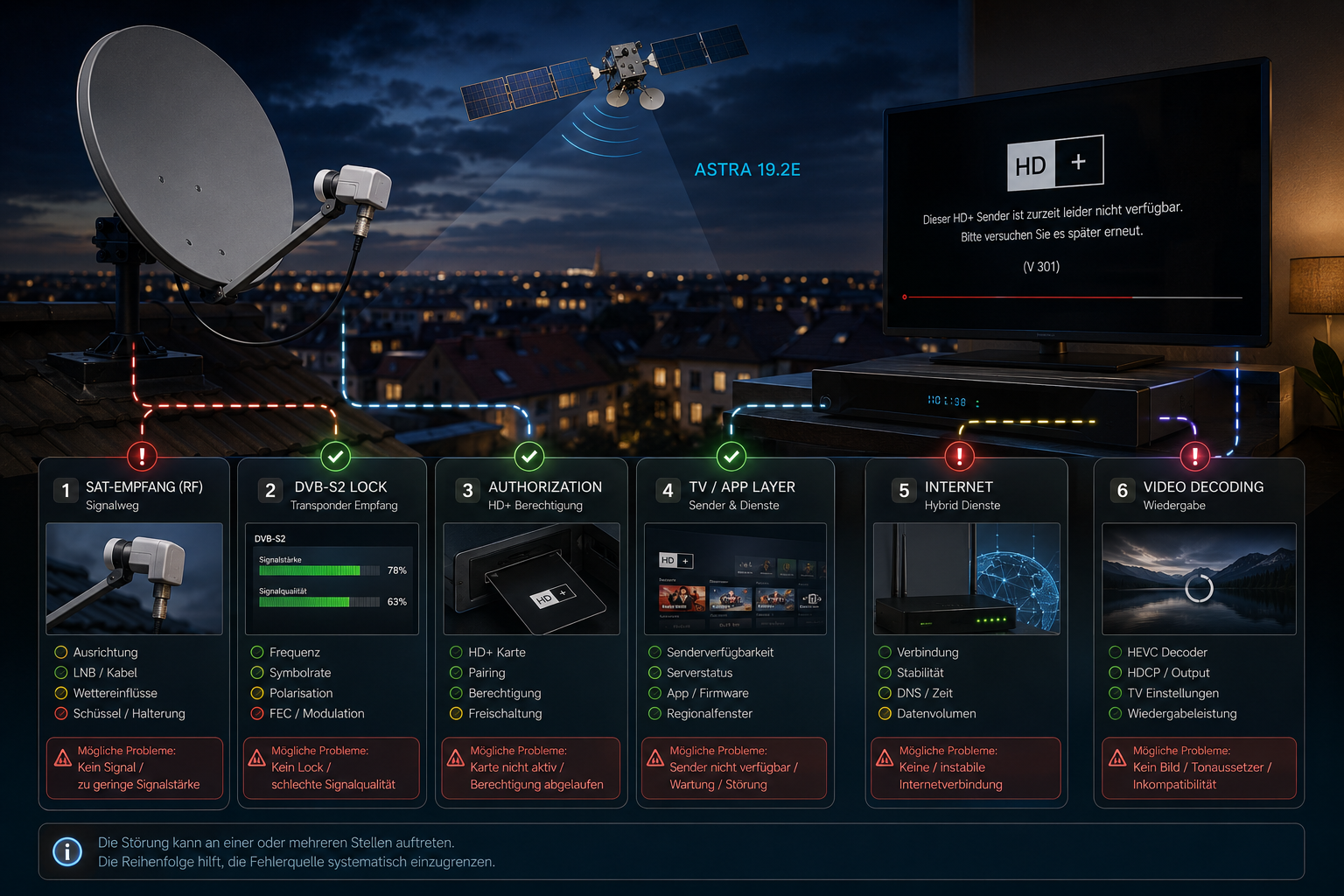
When an HD+ channel suddenly stops working, the failure does not always begin at the satellite dish. HD+ sits on top of several technical layers. The Astra 19.2E RF signal must reach the dish correctly, the receiver must lock the DVB-S2 transponder, Forward Error Correction must recover a valid transport stream, and the receiving device must then process the selected service correctly. Depending on the HD+ receiving method, authorization, software, and connected TV functions can add further layers.
The fastest way to diagnose an HD+ problem is therefore to identify which layer has failed. A “no signal” message points toward a very different problem from a channel that has excellent signal quality but cannot be displayed. Likewise, an internet-based HD+ feature failing while normal satellite television continues working does not automatically indicate an Astra reception problem. Understanding this separation prevents unnecessary dish adjustments, receiver resets, and equipment replacement.
HD+ television reception can involve several independent systems. Astra 19.2E provides the satellite RF path for linear satellite channels. The receiver or television handles DVB-S2 tuning and decoding. Supported HD+ receiving solutions handle the service and authorization layer, while newer connected functions can also depend on broadband connectivity. A failure in one layer does not prove that the others are faulty.
- HD+ Is More Than a Signal Strength Reading
- Start by Identifying What Has Actually Failed
- When the Astra 19.2E Signal Is the Problem
- Why DVB-S2 Lock Can Disappear
- How MER and BER Affect HD+ Reception
- Why Low Signal Margin Causes Intermittent Failure
- Dish Alignment and Weather Effects
- LNB Skew and Polarization Problems
- LNB Oscillator and Band Switching Faults
- Why One HD+ Channel Can Fail While Others Work
- When Authorization Is the Real Problem
- Receiver, CI Plus, and Device Compatibility
- Software and Channel List Problems
- Satellite Versus Internet Problems
- What Happens Inside the Receiver During Failure
- How to Diagnose HD+ Problems Logically
- Reality Check
- Final Verdict
- FAQ
HD+ Is More Than a Signal Strength Reading
A receiver can show strong satellite signal and still fail to display an HD+ channel.
Signal strength represents only an early part of the receiving chain. The tuner must identify the correct carrier, recover symbol timing, demodulate the DVB-S2 signal, and pass the protected data through Forward Error Correction.
Only after that process succeeds does the receiver obtain the transport stream containing the television service.
For protected HD+ services, the device must then satisfy the relevant service and authorization requirements before the programme can be displayed.
This is why a high signal percentage alone cannot prove that HD+ is functioning correctly.
Start by Identifying What Has Actually Failed
The message shown by the television or receiver provides the first useful diagnostic clue.
A “no signal” or missing-quality indication normally means the failure occurs before successful DVB-S2 recovery. Dish alignment, LNB operation, cabling, switches, weather, or tuning parameters should be investigated.
If signal quality remains healthy and free-to-air services on the same transponder work, the RF path is probably functioning.
A message related to the service, module, device, or authorization indicates that troubleshooting should move beyond the antenna system.
If only restart, programme library, app, or other connected functionality fails, the broadband path should be checked separately from satellite reception.
When the Astra 19.2E Signal Is the Problem
HD+ satellite services are associated with the Astra 19.2E television ecosystem used extensively in Germany.
Reliable reception requires the reflector to remain accurately aligned with the orbital position and provide enough carrier quality across the relevant transponders.
A dish can be aligned well enough for strong services while still providing inadequate margin on a weaker or more demanding carrier.
This creates a common situation where many channels appear normal but selected HD services freeze or disappear.
The correct measurement is therefore not simply whether Astra can be received, but how much margin exists on the affected transponder.
Why DVB-S2 Lock Can Disappear
Modern HD satellite services commonly use DVB-S2 because it provides efficient modulation and powerful Forward Error Correction.
The receiver must continuously maintain carrier frequency, phase, and symbol synchronization.
If noise or attenuation becomes excessive, the demodulator begins making more symbol errors. Forward Error Correction can initially repair them, so the viewer sees no change.
As conditions deteriorate further, the remaining decoding margin becomes smaller.
Eventually the receiver can no longer recover the physical-layer frames reliably and DVB-S2 lock disappears. The result can change rapidly from a perfect picture to pixelation, freezing, and finally no signal.
How MER and BER Affect HD+ Reception
MER and BER provide much more diagnostic information than a raw strength percentage.
MER describes the quality of the received modulation. It indicates how accurately the receiver sees the transmitted constellation states.
Poor dish alignment, cross-polarization interference, phase noise, atmospheric attenuation, and unwanted RF energy can all reduce MER.
BER measures the errors created during digital reception.
As MER deteriorates, the receiver normally makes more incorrect symbol decisions and pre-FEC BER increases. DVB-S2 error correction repairs these errors while enough margin remains.
Once the error rate exceeds what the decoding chain can handle, uncorrectable data reaches the transport stream or the receiver loses lock entirely.
| Symptom | Likely Layer | What to Check |
|---|---|---|
| No signal or zero quality | RF or DVB-S2 reception | Dish alignment, LNB, cable, switches, frequency, polarization |
| Pixelation during rain | Low RF margin | MER, BER, dish size, alignment, LNB skew |
| Strong quality but protected service does not display | Service or authorization layer | Supported device, module or receiver status, service entitlement |
| Only one transponder fails | Frequency-specific RF problem | MER, BER, beam, frequency, polarization, LNB response |
| Only connected functions fail | IP or application layer | Internet connection, TV network status, application software |
| Problem starts after software change | Receiver or television software | Updates, rescan, restart, device configuration |
| Failure appears when weather changes | Reduced satellite margin | Rain attenuation, dish alignment, connector condition |
Why Low Signal Margin Causes Intermittent Failure
Signal margin explains why an HD+ channel can work perfectly for hours and then suddenly become unstable.
Every DVB-S2 configuration has a minimum reception requirement. The exact threshold depends on the modulation and coding configuration used by the transponder.
If the installation operates well above that requirement, normal changes in weather and equipment have little visible effect.
If the carrier operates close to the threshold, a small reduction in MER can remove the remaining margin.
The digital picture does not gradually become snowy as an analogue picture would. Error correction keeps the output clean until the receiver approaches its limit, after which failure can appear suddenly.
Dish Alignment and Weather Effects
Rain attenuates Ku-band microwave signals as they travel through precipitation.
A healthy satellite installation includes enough clear-sky margin to tolerate ordinary variations in propagation conditions.
A poorly aligned dish starts with less margin. Rain then removes the remaining reserve more quickly.
Wind can also expose mechanical problems. A loose mount may allow the reflector to move slightly during gusts, reducing carrier quality for a few seconds.
If HD+ failures correlate strongly with rain or wind, the physical satellite path should be investigated before the receiver software is blamed.
LNB Skew and Polarization Problems
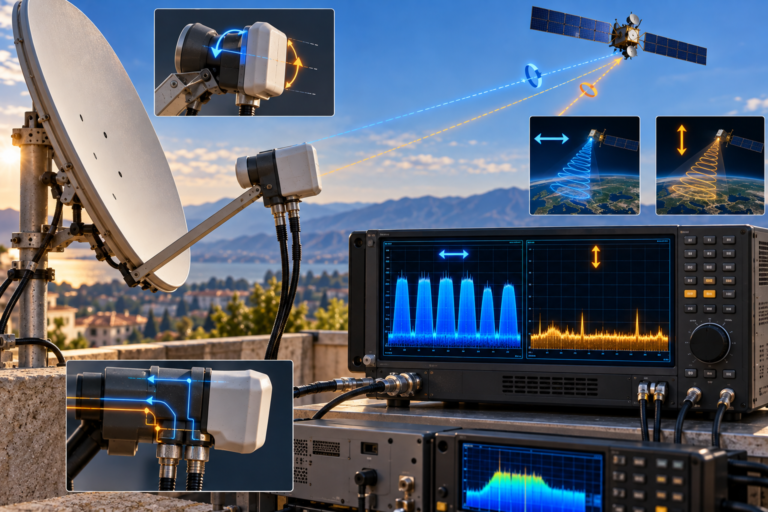
The LNB must separate differently polarized satellite carriers effectively.
Correct skew aligns the feed with the polarization orientation arriving from the satellite.
If skew is incorrect, energy from the opposite polarization can leak into the wanted signal. This unwanted energy can reduce MER even when the strength meter remains high.
A skew problem can therefore affect some transponders much more than others.
Receiver voltage also controls polarization selection in common Universal LNB systems. Poor connectors, cable resistance, switch faults, or receiver power problems can interfere with this process.
LNB Oscillator and Band Switching Faults
The LNB converts the satellite Ku-band signal into an intermediate frequency that can travel through ordinary coaxial cable to the receiver.
A Universal LNB normally uses separate local oscillator frequencies for low-band and high-band reception.
The receiver uses a 22 kHz control tone to request the appropriate band.
If the high-band oscillator becomes unstable or the 22 kHz switching process fails, one group of channels can disappear while others continue working.
An ageing oscillator can also introduce excessive frequency drift or phase noise. The receiver may still detect strong RF power while having greater difficulty maintaining clean DVB-S2 synchronization.
Why One HD+ Channel Can Fail While Others Work
HD+ channels are not all one RF signal.
Different services can be distributed across different Astra transponders with different frequencies, polarizations, symbol rates, modulation and coding configurations, and available signal margins.
One transponder can therefore remain stable while another fails.
If every service on the affected transponder fails together, the problem is likely to be related to RF reception or transponder decoding.
If only one service fails while other services carried by the same transponder remain stable, the satellite carrier itself is probably healthy and the diagnosis should move toward the service or device layer.
When Authorization Is the Real Problem
Protected television introduces a layer that free-to-air reception does not require.
The receiver can successfully lock the satellite carrier and recover the transport stream while the selected protected programme still cannot be displayed.
This distinction is important because adjusting the dish cannot solve an authorization problem.
If the receiver reports healthy signal quality and other services from the same transponder work correctly, check the supported HD+ receiving method, service status, and device-related messages before touching the antenna.
The exact authorization mechanism depends on the receiving equipment and HD+ solution being used, so the device’s current status is more informative than the signal-strength bar.
Receiver, CI Plus, and Device Compatibility
HD+ has been available through different supported receiving configurations, including compatible receivers, television solutions, and CI Plus based equipment.
A technically healthy satellite signal does not guarantee that every receiver can process every service configuration.
The device must support the relevant DVB-S2 parameters, video and audio formats, service protection system, and required software environment.
A compatibility problem often produces a very different symptom from weak reception. Signal quality remains stable, the service may appear in the channel list, and programme information may be available even though the programme itself cannot be displayed correctly.
Software and Channel List Problems
Satellite services can change transponder parameters, programme identifiers, or other information used by the receiver.
An old stored channel entry can therefore stop working even when the replacement service is available through the same dish.
A new channel scan can update the receiver’s service database.
Television and receiver firmware also matters. Software controls tuner operation, service parsing, application functions, device compatibility, and many parts of the user interface.
If a problem begins immediately after a software update, or affects only one device while another receiver works correctly from the same satellite feed, the device itself deserves closer investigation.
Satellite Versus Internet Problems
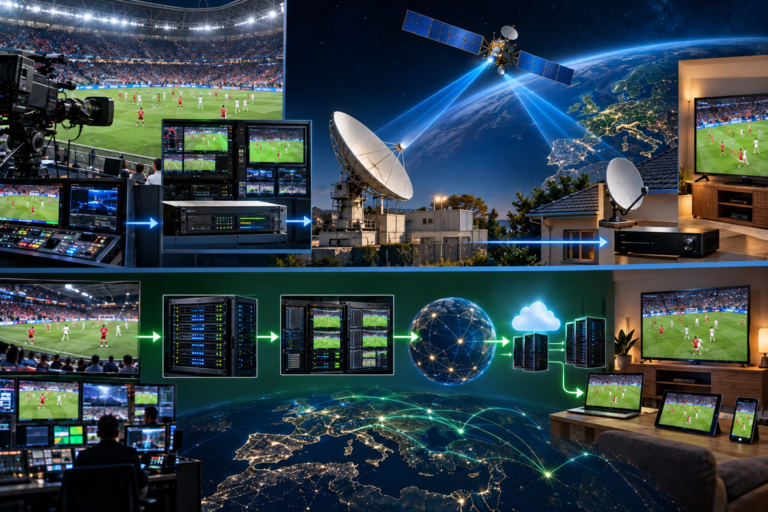
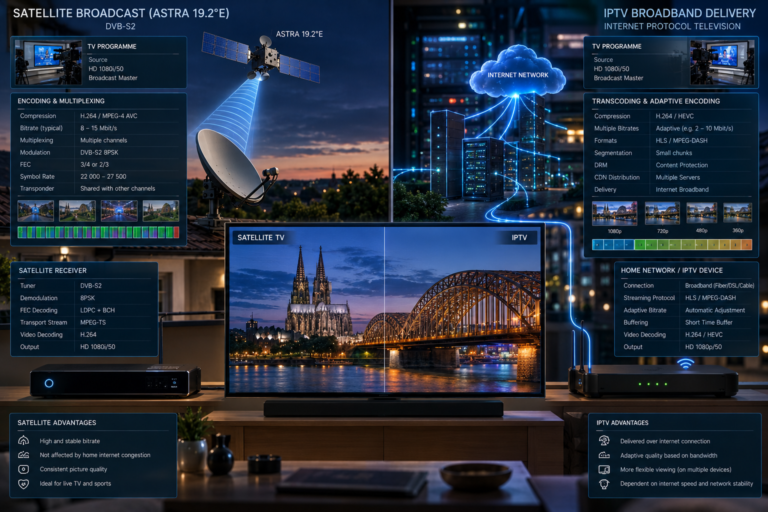
Modern HD+ television experiences can combine satellite broadcasting with internet-based functions.
These paths should not be confused.
The satellite is extremely efficient for delivering the same linear television signal to many households simultaneously. Internet connectivity can provide additional interactive functions, application data, restart features, and media-library content on supported devices.
If the broadband connection fails, satellite reception does not automatically disappear. Likewise, excellent Wi-Fi cannot repair a DVB-S2 carrier that has been lost because of dish misalignment.
A useful diagnostic test is therefore to determine whether normal live satellite channels are affected or only features that require network connectivity.
What Happens Inside the Receiver During Failure
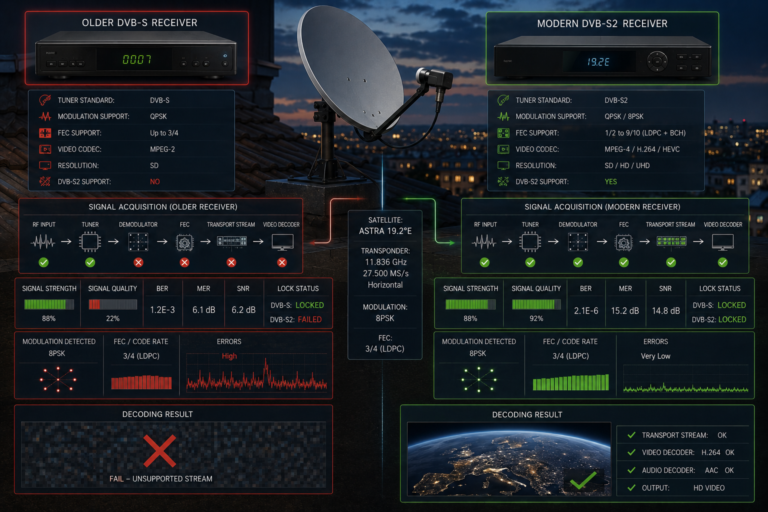
An RF-related HD+ failure begins before the programme itself is decoded.
The tuner first selects the requested intermediate frequency. The demodulator tracks carrier frequency, phase, and symbol timing.
As reception deteriorates, MER falls and raw bit errors increase. LDPC and BCH Forward Error Correction attempt to reconstruct the transmitted information.
If correction succeeds, the transport stream remains clean and the viewer sees a perfect picture.
If too many errors remain, transport packets become unusable or physical-layer synchronization is lost. Video then freezes, breaks into blocks, or disappears.
By contrast, a service-level HD+ failure occurs after this RF chain has already succeeded. That is why the receiver can show excellent satellite quality while the programme remains unavailable.
How to Diagnose HD+ Problems Logically
Begin with the affected channel and check whether the receiver still reports digital quality or lock.
If quality is zero, verify the correct Astra 19.2E transponder parameters and compare other channels on the same frequency. Inspect dish alignment, LNB skew, cabling, connectors, switches, and weather conditions.
If quality is unstable, monitor MER and BER where possible. A low MER or rapidly rising BER indicates that the receiver is losing RF decoding margin.
If quality is healthy, test other services on the same transponder. When they work normally, avoid unnecessary dish adjustment and investigate the service layer instead.
Check whether the receiving device is supported, whether its software is current, whether the channel list needs updating, and whether any service or authorization message is being displayed.
Finally, separate internet-dependent functions from satellite reception. Test the television’s network connection only when the failed feature actually requires the IP path.
This separation becomes especially important as HD+ combines broadcast television with connected functions. Our guide to how HD+ uses both satellite and internet explains why the DVB-S2 RF path and broadband path can fail independently even though they appear inside the same television interface.
An HD+ channel stopping does not automatically mean the satellite signal has failed.
The problem can occur at the dish, LNB, cable, DVB-S2 demodulator, transport stream, service authorization, receiver software, device compatibility, or internet-connected feature layer.
The receiver’s error message and the behaviour of other channels on the same transponder usually provide more useful diagnostic information than repeatedly rescanning or adjusting the dish.
HD+ channels sometimes stop working because the television service depends on several technical layers operating correctly at the same time.
At the RF level, dish alignment, rain attenuation, LNB skew, oscillator stability, cable condition, interference, MER, BER, and signal margin determine whether the receiver can maintain DVB-S2 lock and recover a clean transport stream.
After successful satellite reception, supported equipment must still process the selected service correctly. Authorization, device compatibility, channel data, and software can therefore cause failure even when the satellite signal is excellent. Connected HD+ functions can introduce a separate internet path with its own network and application problems.
The correct approach is to identify the failed layer before changing anything. Check RF lock first, compare channels on the same transponder, evaluate MER and BER where available, then move toward service, device, software, and internet troubleshooting only after the satellite path has been confirmed healthy.
| Question | Answer |
|---|---|
| Why did my HD+ channel suddenly stop working? | The cause can be RF reception, loss of DVB-S2 lock, low signal margin, a service or authorization issue, device compatibility, software, or an internet-dependent feature. |
| Does strong signal strength prove HD+ should work? | No. The receiver still needs adequate MER, acceptable BER, DVB-S2 synchronization, a valid transport stream, and successful service processing. |
| Why do HD+ channels pixelate during rain? | Rain attenuates Ku-band signals. An installation with limited clear-sky margin can cross the DVB-S2 decoding threshold during precipitation. |
| Can poor dish alignment affect only some HD+ channels? | Yes. Different transponders have different frequencies, modulation and coding configurations, and reception margins, so marginal carriers usually fail first. |
| Can LNB skew cause HD+ problems? | Yes. Incorrect skew can increase cross-polarization interference, reduce MER, raise BER, and reduce decoding margin. |
| Why does one HD+ channel fail while another works? | They may use different transponders with different RF parameters and signal margins. If they share a transponder, the failure may instead be service-specific. |
| Can an HD+ service fail even with excellent signal quality? | Yes. Successful DVB-S2 reception does not guarantee successful authorization, codec processing, software operation, or device compatibility. |
| Does HD+ always require an internet connection for satellite reception? | No. Satellite reception and connected functions are separate technical paths. The exact requirements depend on the HD+ receiving solution and feature being used. |
| Can Wi-Fi problems cause satellite no signal? | No. Wi-Fi cannot create or restore the Astra RF carrier. It can affect connected features, but a satellite no-signal condition must be investigated in the RF path. |
| Can an old channel list cause a channel to stop working? | Yes. Broadcasters can change service or transponder parameters, so rescanning may be necessary when stored information becomes outdated. |
| What should I check first when HD+ stops? | Check whether the affected transponder still has digital quality or lock, then compare other services on the same transponder before investigating authorization, software, or internet functions. |
| Should I realign the dish if only one service is unavailable? | Not immediately. If other services on the same transponder have stable reception, the dish and DVB-S2 RF path are probably functioning correctly. |